
CLI & agents (macx)
macx puts Mac Explorer’s index on the command line: name search, read-only SQL, disk usage and engine status, with one JSON envelope and typed exit codes. It’s built for scripts and AI agents, and read-only towards your files.
Getting started
The installer puts macx at ~/.local/bin/macx. Make sure that folder is on your PATH, then:
macx help              # every command, grouped
macx help sql          # one command: usage, flags, exit codes, JSON shape
macx commands --json   # the whole command table, machine-readable
macx manual            # the full API manual (schema, gotchas, recipes)
macx version           # CLI + engine version and compatibility
macx is self-describing, so an agent that has never seen it can run macx help or macx manual and get to work.
Commands
| Group | Commands |
|---|---|
| Discovery | help, commands, manual, version |
| Find | search, tree, du, dupes, imagemeta, bigdirs |
| Agent plane | sql, schema, recipes, lints, preview |
| Disk | disk (summary), disk top, disk growth, disk volume, disk status, disk scan |
| Engine | engine (status), engine wait, status, activity |
| Index | index, hash, analyze, serve |
| App | open, go (alias reveal), view, update, doctor, defaults, quick-actions, service |
search
Find files and folders by name, ranked the same way as ⌘K.
macx search invoice --ext pdf --limit 20 --json
macx search "raw footage" --in ~/Videos --min 1g --size
Flags: --in <dir>, --ext mp4,jpg, --min / --max (sizes like 500mb, 1g), --size (sort by size), --limit N, --tier 1-3 (1 = normal only, 2 adds gitignored content, 3 adds size-only folders).
sql
Read-only SQL over the index. Most questions are one query:
# What is eating space in Documents, by file type?
macx sql "SELECT ext, count(*) n, sum(size) bytes FROM files
          WHERE path LIKE '/Users/me/Documents/%'
          GROUP BY ext ORDER BY bytes DESC" --limit 20 --json

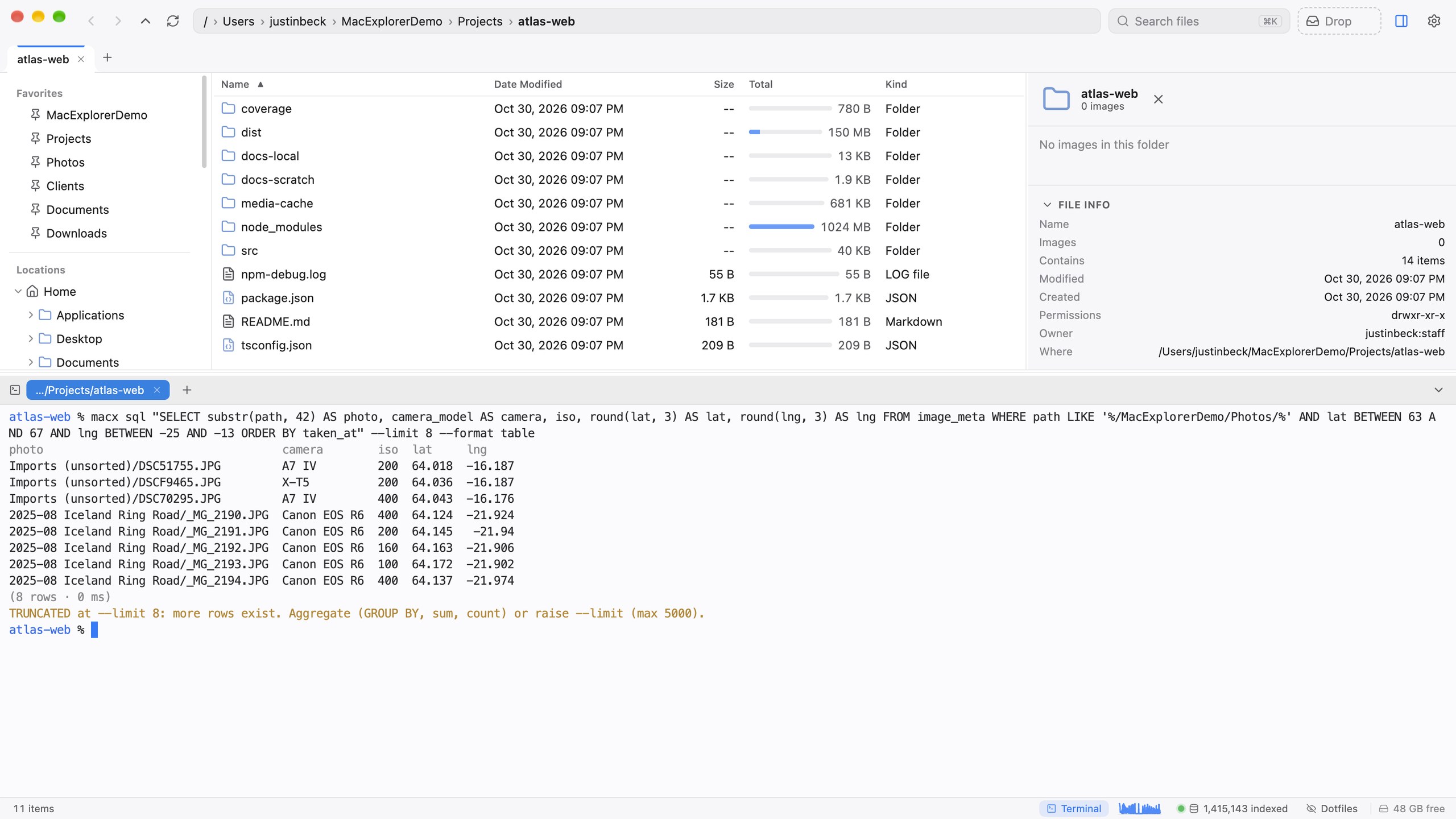
# Photos taken in Iceland (GPS bounding box)
macx sql "SELECT path, taken_at, camera_model FROM image_meta
          WHERE lat BETWEEN 63 AND 67 AND lng BETWEEN -25 AND -13" --json
Only SELECT and WITH … SELECT are accepted, one statement at a time. The database is opened read-only, queries are cancelled after a timeout, and results are capped (--limit, default 200, max 5,000). The response says when rows were cut. Pass - to read the query from stdin. --format table|tsv|ndjson changes the text output.
Run macx schema before writing SQL. It lists the tables (files, dirs, roots, bigdirs, image_meta, activity and the space_* disk ledger), row counts, indexes and notes.
recipes and lints
macx recipes                      # worked queries
macx recipes biggest-folders      # one recipe, with its caveats
macx lints --json                 # what looks disorganized
Recipes include disk-by-type, biggest-folders, reclaimable-duplicates, downloads-triage, recent-changes, photos-by-time-and-place and stale-archives.
Lints report duplicate files, download sediment (Downloads files untouched for more than 180 days), crowded folders (more than 300 files), unanalysed images, index blind spots and stale locations. Each finding comes with a count, bytes, a sample and the SQL that produced it, so an agent can come to you with a cleanup proposal rather than a list of questions.
disk
The disk ledger behind Disk Usage, covering the whole Mac:
macx disk --json                       # "This Mac": where the space goes
macx disk top ~/Library --depth 2      # biggest folders below a path
macx disk growth --days 30             # what grew or shrank
macx disk volume                       # capacity, free, purgeable, snapshots, unattributed
macx disk status                       # when it last measured, unreadable folders
macx disk scan --follow                # re-measure now (reads sizes only, never contents)
engine
macx engine status --json      # phase, running job, queue, lag, CPU and memory
macx engine wait --timeout 120s  # block until the engine is idle
macx status                    # indexed locations and totals
macx activity --limit 10       # recent index, hash, analyze and disk jobs
Scripts that need fresh results can run macx engine wait first, or pass the global --wait flag to any command.
Everything else
| Command | What it does |
|---|---|
macx tree <path> | A folder’s children by size, from the index |
macx du <path> | A folder’s rolled-up size and its biggest children |
macx dupes --min 100mb | Duplicate groups (exact after macx hash, otherwise same-size candidates) |
macx imagemeta <file> | A photo’s EXIF and GPS metadata |
macx bigdirs | Folders kept size-only because they’re huge |
macx preview <file> | The start of a text file, or the path to a thumbnail |
macx index <dir> | Index a folder (changes the index only) |
macx hash / macx analyze | Hash duplicate candidates / extract photo metadata |
macx open, go, view | Open Mac Explorer at a folder, go to a pasted path, open a file in the viewer |
macx doctor | Check the installation. See Troubleshooting |
macx update | Download and run the installer (--dry-run to preview) |
The JSON envelope
With --json, stdout carries exactly one JSON object. Notes and progress go to stderr.
{ "ok": true, "data": { "results": [ … ] }, "meta": { "source": "server", "ms": 41, "api": 1 } }
On failure:
{ "ok": false, "error": { "code": "not_indexed", "message": "…", "hint": "…", "exit": 4 } }
meta.source is server when the running app answered, or db when the CLI read the index file directly because the app wasn’t running. error.code is a stable name for scripts to switch on.
Exit codes
| Code | Name | When |
|---|---|---|
0 | ok | Success |
1 | error | Internal error, a job failed, or doctor found a problem |
2 | usage | Unknown command or flag, or a missing argument |
3 | engine_unavailable | No index engine, still loading, stuck, or --wait expired |
4 | not_found | No such path, not in the index, not indexed, or no such recipe |
5 | forbidden | Outside the indexed locations, a symlink escape, SQL rejected, or a stale token |
6 | network | Update feed or installer unreachable |
7 | busy | A conflicting job is running (pass --wait to wait) |
8 | version_mismatch | The engine lacks that feature, or speaks a different API version |
124 | timeout | --timeout was hit |
Global flags
| Flag | Effect |
|---|---|
--json | One JSON envelope on stdout |
--wait[=60s] | Wait for the engine first: reads wait for it to answer, writes for it to be idle |
--launch | If the engine is down, start the app in the background and wait (or set MACX_AUTOLAUNCH=1) |
--timeout <dur> | Per-request timeout. When hit, exits 124 |
--quiet | No notes or progress on stderr |
--no-color | No colour (automatic when piped, or with NO_COLOR) |
Read-only by design
macx and the API behind it are safe to hand to an agent:
- Nothing can touch your files. There is no command or endpoint that moves, renames or deletes anything. The commands that write (
index,hash,analyze,disk scan) only rebuild the index. - SQL is read-only three times over: a keyword check, a read-only database connection, and a timeout with row caps.
- The CLI never starts its own index. It talks to the app’s engine. If the app isn’t running, read commands open the index file read-only and write commands exit
3, unless you pass--launch. - Paths are checked. File-level requests must be absolute paths inside your indexed locations, with no
.., and symlinks are resolved and re-checked so they can’t escape. - Agent traffic is never part of analytics.
Secret files stay secret
Names of secret-bearing files are searchable (the index never stores contents), but their contents can’t be read through macx preview or the API. They return a forbidden error. That covers:
.envand.env.*(templates like.env.exampleare fine)- private keys and certificates (
.pem,.key,.p12,.pfx,.p8, keystores,id_rsa,id_ed25519and friends) - credential files:
.npmrc,.netrc,.pypirc,.git-credentials,.pgpass,credentials.json,service-account.jsonand similar - anything inside
.ssh,.aws,.gnupg,.kube,.dockerorKeychains
The check runs on the real path, so a harmless-looking symlink that points at ~/.ssh/id_ed25519 is still blocked.
The local API
macx is a thin client over a local HTTP server that Mac Explorer runs on 127.0.0.1 (port 7799 by default). It’s for tools that would rather speak HTTP:
GET http://127.0.0.1:7799/returns the full manual with no authentication.- Everything else needs the bearer token from
~/Library/Application Support/mac-explorer/server.json, a file only your user can read. - Requests that come from a web browser are rejected, so a web page can’t reach the server.
POST /reveal?path=…points the Mac Explorer window at a path, so an agent can show you a file rather than describe it.